Checking vehicle-camera policies
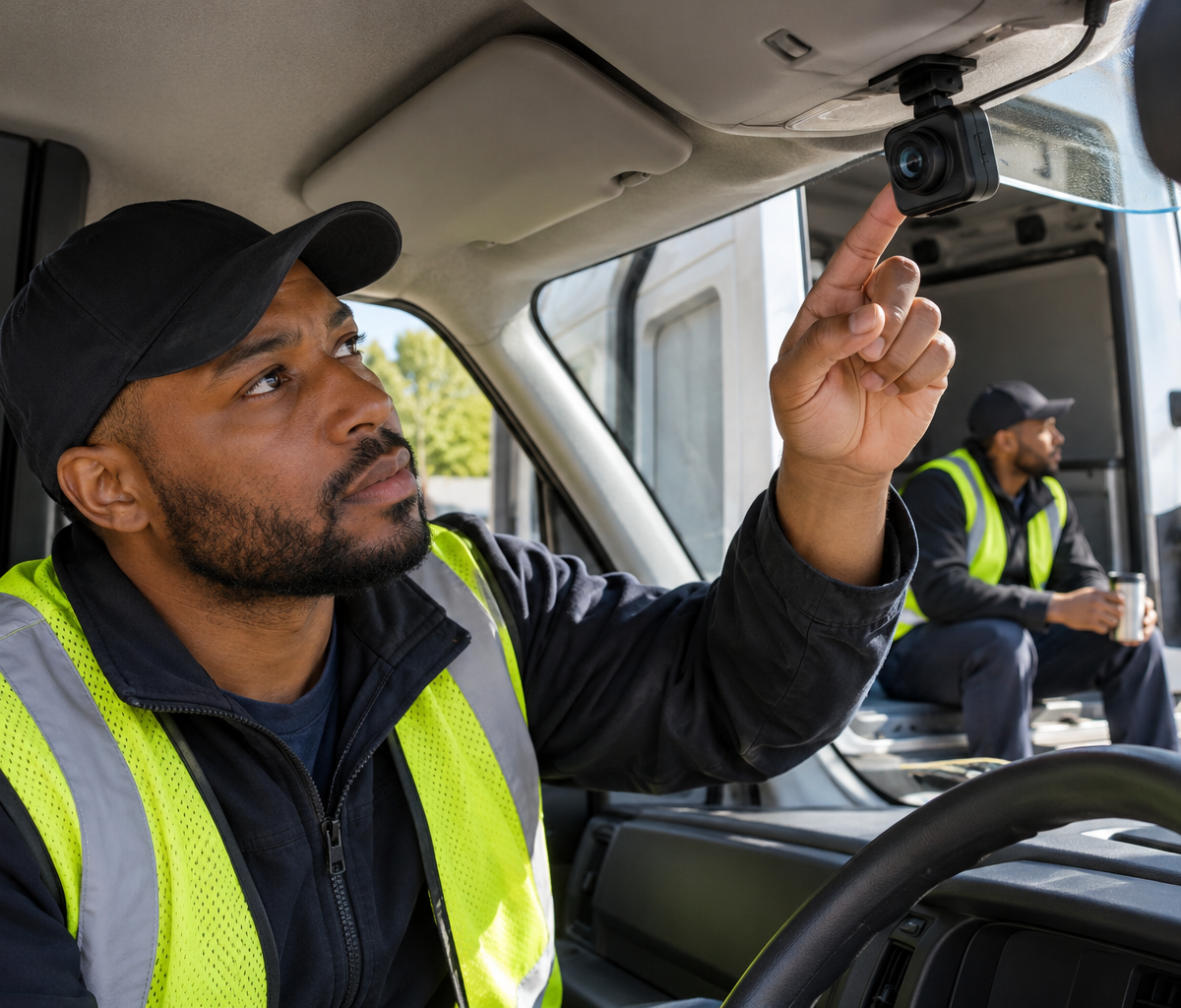
Learn how vehicle cameras record, who can review footage and how long it remains available before deciding whether a driving role fits privacy expectations.
An applicant learns that a delivery van has an inward-facing camera. The role involves long shifts, waiting between stops, and breaks in or near the vehicle. The applicant wants to know whether the camera records continuously, who can watch the footage, and when it is deleted. Checking vehicle-camera policies means asking for the documented recording boundary before deciding whether the role fits their privacy expectations.
Inward- and outward-facing cameras exist in commercial-vehicle settings; NTSB investigations have used footage from such systems. That fact does not establish what Delpack uses. The FTC's general business guidance recommends limiting access to personal information and setting written retention practices. It is a useful framework for questions about access and storage, not a statement of employment-camera law or a Delpack policy.
Map the camera placement
The camera placement determines what can be captured. Ask whether the vehicle has a road-facing lens, a cab-facing lens, a cargo-area camera, or a combination. Where does each lens point when the van is parked? Can it see a driver on break, a passenger seat, a loading area, or the area immediately outside a door? A label that says “dashcam” may describe several very different views.
Ask whether any camera records audio. A driver may accept video of the road but have different expectations about conversations inside the cab. The employer should state which channels collect sound and whether a microphone is active during stops or breaks. Do not infer audio capture from a visible lens or assume there is none because the policy mentions only video.
Find out whether the camera's view changes with vehicle models. A fleet may use more than one device or mount position. The candidate should know whether the policy applies to every assigned van or only certain vehicles. If drivers rotate vans, the employer should explain how they are informed about the equipment in the vehicle they receive that day.
Ask whether the camera view includes customers or bystanders during deliveries. A road-facing lens may capture a public street, while a door or cargo camera may capture a customer's property. The employer should explain how it limits unnecessary recording, handles footage involving other people, and informs drivers which camera is active at a stop.
Find out whether a camera is installed by the employer, a vehicle lessor, or another service provider. That can affect who manages settings and storage. A candidate need not study the vendor's entire system, but should know who is responsible for explaining the recording scope and answering questions about the data. “The vendor handles it” does not tell the driver what is collected.
Checking vehicle-camera policies begins with a simple request: show the camera locations in a typical assigned van and explain each view. A clear answer lets the applicant evaluate the actual work environment rather than imagining that every camera is aimed only at the windshield or only at the driver.
Learn the recording trigger
A recording trigger determines when footage is captured or saved. Ask whether the system records continuously, saves short clips after a driving event, starts when the ignition turns on, or can be activated manually. Some systems may record a rolling buffer and preserve only selected events. The employer should explain its own configuration in plain language, including whether “not saved” means no footage exists after the buffer expires.
Ask what happens while the van is parked. The engine may be off while the driver sorts parcels, calls dispatch, or takes a break. Does the camera keep recording, stop automatically, or switch to another mode? The answer matters more than a broad phrase such as “during work hours,” because a break may occur inside the workday with the driver still in the cab.
Find out whether a driver can pause a camera and under what circumstances. A system may have a privacy mode for breaks, or the employer may prohibit manual changes. The candidate should not assume either. Ask how any pause is recorded, whether it affects road-facing and inward-facing views equally, and what the driver must do when the break ends.
Ask whether the system can be viewed live. Stored clips reviewed after an event create a different privacy expectation from a supervisor's ability to watch a current feed. The employer should state whether live access exists, who has it, and for what reasons it may be used. A device can be recording without anyone watching at that moment; the two functions should be explained separately.
Find out what alerts or automated classifications the camera creates. A device may flag hard braking, distraction, or another driving event. Ask whether an alert automatically saves video, whether a person reviews it before it affects a driver, and how the worker can provide context. The article does not assume the employer uses any particular scoring system; the point is to learn how recording becomes a workplace decision.
Checking vehicle-camera policies includes off-duty boundaries. If a van remains with a driver after a shift or is parked during an unpaid break, ask whether the camera is still powered and what it records. The answer should come from the written policy and actual device setup, not from a guess based on whether the dashboard screen looks dark.
Identify footage access and uses
The footage access policy says who can retrieve or watch video. The list may include a safety manager, fleet supervisor, vendor support staff, insurer, or people handling a specific incident. Ask which roles have routine access, whether access is logged, and who approves sharing outside the company. The FTC's general guidance on personal information supports limiting access to a legitimate business need; it does not specify this employer's exact permissions.
Ask what purposes the employer states for review. A safety coaching program, collision investigation, customer complaint, or equipment troubleshooting may use footage differently. A policy should identify permitted uses and who can initiate each kind of review. “For safety” is broad if the same recording can also be used in a performance dispute or a service investigation.
Find out whether a driver is notified when footage is reviewed. Some events may require prompt review, while others may arise weeks later. Ask whether the worker can see the relevant clip, provide an explanation, or correct a mistaken vehicle assignment. An image can show part of an event without the full road or customer context. A fair process should explain how the employer uses a clip before drawing a conclusion about a person.
Ask how footage is shared with third parties. A vendor may host it; an insurer or investigator may request a copy after an incident. The employer should say who authorizes disclosure and whether the same access limits follow a downloaded clip. A driver should know whether “stored in the cloud” means accessible only to a small internal team or also to a service provider under defined terms.
Find out how footage involving other drivers is handled. A vehicle may be reassigned after one shift, and a clip could be attributed to the wrong person if the system's driver login is inaccurate. Ask how the company binds video to the correct shift and vehicle, and how a worker disputes an error. This is a concrete operational question, not a claim that misattribution has happened at Delpack.
The article concerns the camera policy itself. Package-theft response may involve reviewing a clip, but it asks who investigates a missing parcel and what a driver must document. Location tracking asks what GPS data a phone or vehicle collects. Checking vehicle-camera policies focuses on images and audio, the people who can access them, and the purposes for which they are used.
Check footage retention and deletion
The footage retention period is how long video remains available. Ask how long routine recordings or clips are kept, whether event-tagged footage lasts longer, and what happens when a collision or complaint creates a preservation hold. A single answer such as “30 days” may not cover all categories. The employer should distinguish ordinary deletion from an exception that extends storage.
Find out whether audio and video have the same retention period. A device may keep a short event clip but not a continuous stream, or may upload only flagged recordings. The candidate should ask what is actually stored, where it is held, and when the local device copy is erased. An automatic deletion setting matters only if the employer can explain what copies remain.
Ask whether the policy states who can change the retention period. A vendor update or management decision could alter settings after a driver starts the job. The company should explain how workers learn about material changes. A policy reviewed during hiring is useful only if it remains available and current when the worker is assigned a van.
Find out how a driver can ask about a clip retained for an incident. A worker may want to know whether video from their shift exists and whom to contact if they believe it should be preserved. The employer should provide the correct channel and explain any limits on access. This article does not assert a universal right to view or delete footage; those questions depend on applicable rules and the employer's policy.
Ask what security protects stored footage. The FTC advises businesses to limit access and use written retention practices for personal information. For a vehicle camera, the candidate can ask whether access is role-based, whether retrievals are logged, and how downloaded copies are controlled. A promise that footage is “secure” is more useful when the employer can describe the actual safeguards.
Checking vehicle-camera policies should leave the applicant knowing the normal storage period and the incident exception. Both affect privacy expectations. A camera that records briefly but preserves selected clips for a long investigation has a different practical boundary from a system that continuously archives every shift.
Work through a camera-on-break example
Imagine a delivery van with an inward-facing camera. The driver finishes a group of stops, parks safely, and takes a break in the cab with the engine off. The camera indicator remains lit. This is an illustrative policy question, not a description of a Delpack vehicle or a conclusion that recording is occurring.
The applicant asks what the indicator means. The employer explains whether the lens is capturing video, whether audio is active, whether only a short rolling buffer exists, and whether a supervisor can view a live feed. If a privacy mode exists, the applicant asks how to use it and whether it applies during an unpaid break. A visual indicator alone does not answer those questions.
Suppose the camera continuously records but routine footage is deleted after a defined interval unless an event is flagged. The candidate then asks who may flag an event, who reviews the clip, and how long flagged footage remains. They also ask whether the break period can generate an alert. Those details show the actual privacy boundary more clearly than a statement that cameras are “for safety.”
Now suppose the employer says the inward-facing camera stops when the engine is off. The applicant can ask whether parking mode, a manual trigger, or remote access changes that answer. The aim is not to catch the employer in a contradiction; it is to understand how the written rule and the installed device behave under the same everyday scenario.
If the applicant is comfortable with the described recording, they can proceed with that knowledge. If the camera captures breaks or audio beyond their expectation, they can weigh that before accepting. A camera policy is a work-condition decision. It should be understandable without guessing at a vendor's default settings.
The example stays with video and audio. A phone app that continues collecting GPS location after work belongs to the location-tracking policy. A missing package belongs to the theft-response procedure even if video may later be evidence. Keeping these scopes separate makes each employer answer easier to verify.
Questions to ask for the written policy
Ask where the cameras are placed, whether they record audio, and whether every assigned vehicle uses the same configuration. When does recording begin and end? Does it continue while parked, during breaks, or after a shift? Can anyone watch live? Request the policy that describes these settings and ask how drivers learn when it changes.
Ask who can review footage, for what purposes, and whether a driver may provide context before it is used in a work decision. How long are routine clips retained, what extends retention, and who approves external sharing? A written answer should connect the installed device to the employer's actual access and deletion practices.
Checking vehicle-camera policies gives an applicant a concrete way to assess recording and privacy expectations before joining a fleet. Related work topics are in the driver guide hub, and local openings appear on the Fort Wayne driver careers page.
Continue with Delpack
Review the Fort Wayne career overview or contact Delpack with a question about the company.